

Facility management · Chennai
EFS Portal
Built by Raaxo. Run by EFS. Daily.
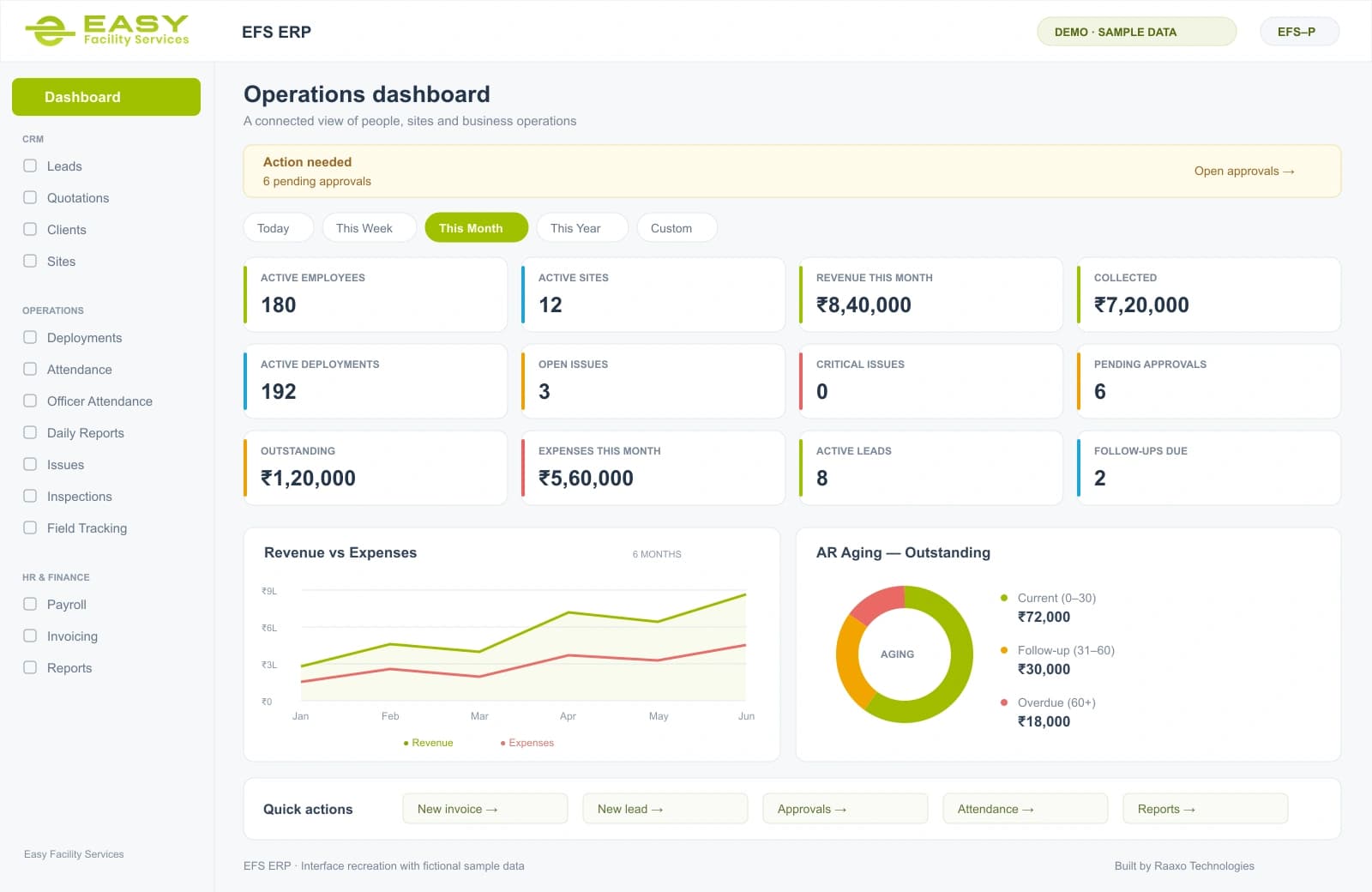
Attendance, payroll, field operations, client management, invoicing and compliance in one ERP that EFS uses daily.
Build · Mobile Apps
An app can put your business in someone's pocket — whether that's your field staff marking attendance from a site, or a customer booking you in two taps. We build mobile apps that are genuinely useful and genuinely used, not ones that get installed once and forgotten.
Related work from Raaxo
Explore the project and its delivered scope. Each case study explains the work in context.
Facility management · Chennai
Built by Raaxo. Run by EFS. Daily.
Attendance, payroll, field operations, client management, invoicing and compliance in one ERP that EFS uses daily.
The problem we solve
Not every app belongs on the App Store. In fact, most of the apps we build aren't for the public at all — they're private company apps that a business's own team uses every day: field staff logging work, managers tracking operations, employees doing in minutes what used to mean phone calls and paperwork. If that's what you need, that's exactly the kind of app we build, and we know it well — we built and run one ourselves.
When an app is meant for the public — for your customers to download and use — we build that too, and we handle publishing it to the Google Play Store and Apple App Store for you, so you're not left navigating that alone.
Whether it's Android, iOS, or both, we build for the way people really use their phones: quick, reliable, and simple enough that nobody needs a manual. The technology serves the experience, never the other way around.
An example of how the work connects
Illustrative flow · Exact steps and approvals agreed during discovery.
What we can build together
Choose the work that solves the problem. Your proposal defines the deliverables, integrations and responsibilities included.
Android, iOS, or both — built to fit how it'll really be used
Private company apps for staff and operations, or public apps for customers
Publishing to the Play Store and App Store handled for you, for public apps
A clean, simple experience your users don't need training to understand
Built to connect with your existing systems and data where needed
Reliable performance, even on everyday phones and patchy connections
Who it’s for
Before you commit
The practical decisions belong in the open. Discuss these before settling the scope and quote.
Decide Android, iOS or both based on the actual users, and agree how private staff apps will be distributed.
Specify what remains usable without a connection, what must sync later, and how conflicting updates are resolved.
Agree store accounts, permissions, backend integration, supported devices and responsibility for updates after launch.
Deliverables and review stages. Data and account access. Ownership and third-party fees. Handover, training and post-launch support. Agree what is included and what is separate.
How we work together
You work with the people doing the work. Scope, reviews and handover are part of the conversation from the beginning.
Map the current process, the people involved and what needs to improve.
A clear scope and prioritiesReview the direction and key flows before committing to implementation.
An agreed directionReview work at each stage, resolve questions early and check it against the scope.
Work you can reviewPrepare the documentation and training your team needs. Agree the support arrangements.
A handover your team can useYes — and it's the most common thing we build. Plenty of businesses need an app purely for their own team: field staff, site managers, employees. It never goes on the public stores; it's just for your people. We've built and we run exactly this kind of app ourselves, so we understand it deeply.
Both, depending on what makes sense for you. If your team all uses Android, there's no need to pay for iOS too. If your customers are on both, we'll cover both. We'll help you decide rather than selling you more than you need.
Yes. For apps meant for the public, we handle publishing to the Google Play Store and Apple App Store for you, so you don't have to figure out that process yourself.
Usually, yes. Many of the apps we build talk to a business's existing system — pulling in data, sending updates back — so the app and the rest of your operation stay in sync. We'll tell you honestly what's possible in your case.
Let’s talk · Mobile Apps
Bring the process, the problem or the idea. We’ll discuss what needs to change, what can stay, and the right first step.
No finished specification needed. Start with a conversation.